- java.lang.Object
-
- javafx.scene.Node
-
- javafx.scene.Parent
-
- javafx.scene.layout.Region
-
- javafx.scene.control.Control
-
- org.controlsfx.control.PropertySheet
-
- All Implemented Interfaces:
- javafx.css.Styleable, javafx.event.EventTarget, javafx.scene.control.Skinnable
public class PropertySheet
extends javafx.scene.control.Control
The PropertySheet control is a powerful control designed to make it really easy for developers to present to end users a list of properties that the end user is allowed to manipulate. Commonly a property sheet is used in visual editors and other tools where a lot of properties exist.To better describe what a property sheet is, please refer to the picture below:
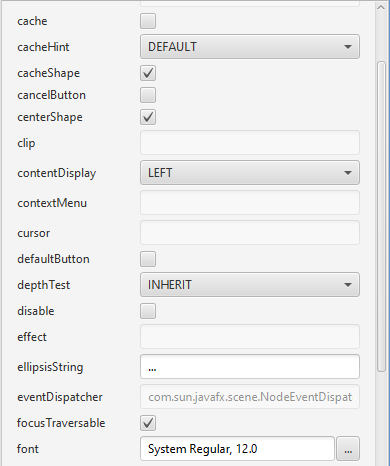
In this property sheet there exists two columns: the left column shows a label describing the property itself, whereas the right column provides a
PropertyEditorthat allows the end user the means to manipulate the property. In the screenshot you can see CheckEditor, ChoiceEditor, TextEditor and FontEditor, among the many editors that are available in theEditorspackage.To create a PropertySheet is simple: you firstly instantiate an instance of PropertySheet, and then you pass in a list of
PropertySheet.Iteminstances, where each Item represents a single property that is to be editable by the end user.Working with JavaBeans
Because a very common use case for a property sheet is editing properties on a JavaBean, there is convenience API for making this interaction easier. Refer to theclass, in particular theBeanPropertyUtils.getProperties(Object)method that will return a list of Item instances, one Item instance per property on the given JavaBean.- See Also:
PropertySheet.Item,PropertySheet.Mode
-
-
Property Summary
All Methods Instance Methods Concrete Methods Type Property and Description javafx.beans.property.SimpleObjectProperty<java.util.Comparator<java.lang.String>>categoryComparatorUsed to represent how the categories should be laid out in the PropertySheet when using the Category mode (seePropertySheet.Mode).javafx.beans.property.SimpleObjectProperty<PropertySheet.Mode>modeUsed to represent how the properties should be laid out in the PropertySheet.javafx.beans.property.SimpleBooleanPropertymodeSwitcherVisibleThis property represents whether a visual option should be presented to users to switch between the variousmodesavailable.javafx.beans.property.SimpleBooleanPropertysearchBoxVisibleThis property represents whether a text field should be presented to users to allow for them to filter the properties in the property sheet to only show ones matching the typed input.-
Properties inherited from class javafx.scene.control.Control
contextMenu, skinClassName, skin, tooltip
-
Properties inherited from class javafx.scene.layout.Region
background, border, cacheShape, centerShape, height, insets, maxHeight, maxWidth, minHeight, minWidth, opaqueInsets, padding, prefHeight, prefWidth, scaleShape, shape, snapToPixel, width
-
Properties inherited from class javafx.scene.Node
accessibleHelp, accessibleRoleDescription, accessibleRole, accessibleText, blendMode, boundsInLocal, boundsInParent, cacheHint, cache, clip, cursor, depthTest, disabled, disable, effectiveNodeOrientation, effect, eventDispatcher, focused, focusTraversable, hover, id, impl_showMnemonics, impl_treeVisible, inputMethodRequests, layoutBounds, layoutX, layoutY, localToParentTransform, localToSceneTransform, managed, mouseTransparent, nodeOrientation, onContextMenuRequested, onDragDetected, onDragDone, onDragDropped, onDragEntered, onDragExited, onDragOver, onInputMethodTextChanged, onKeyPressed, onKeyReleased, onKeyTyped, onMouseClicked, onMouseDragEntered, onMouseDragExited, onMouseDragged, onMouseDragOver, onMouseDragReleased, onMouseEntered, onMouseExited, onMouseMoved, onMousePressed, onMouseReleased, onRotate, onRotationFinished, onRotationStarted, onScrollFinished, onScroll, onScrollStarted, onSwipeDown, onSwipeLeft, onSwipeRight, onSwipeUp, onTouchMoved, onTouchPressed, onTouchReleased, onTouchStationary, onZoomFinished, onZoom, onZoomStarted, opacity, parent, pickOnBounds, pressed, rotate, rotationAxis, scaleX, scaleY, scaleZ, scene, style, translateX, translateY, translateZ, visible
-
-
Nested Class Summary
Nested Classes Modifier and Type Class and Description static interfacePropertySheet.ItemA wrapper interface for a single property to be displayed in aPropertySheetcontrol.static classPropertySheet.ModeSpecifies how thePropertySheetshould be laid out.
-
Constructor Summary
Constructors Constructor and Description PropertySheet()Creates a default PropertySheet instance with no properties to edit.PropertySheet(javafx.collections.ObservableList<PropertySheet.Item> items)Creates a PropertySheet instance prepopulated with the items provided in the itemsObservableList.
-
Method Summary
All Methods Instance Methods Concrete Methods Modifier and Type Method and Description javafx.beans.property.SimpleObjectProperty<java.util.Comparator<java.lang.String>>categoryComparatorProperty()Used to represent how the categories should be laid out in the PropertySheet when using the Category mode (seePropertySheet.Mode).protected javafx.scene.control.Skin<?>createDefaultSkin()java.util.Comparator<java.lang.String>getCategoryComparator()javafx.collections.ObservableList<PropertySheet.Item>getItems()PropertySheet.ModegetMode()javafx.util.Callback<PropertySheet.Item,PropertyEditor<?>>getPropertyEditorFactory()java.lang.StringgetTitleFilter()java.lang.StringgetUserAgentStylesheet()protected java.lang.StringgetUserAgentStylesheet(java.lang.Class<?> clazz, java.lang.String fileName)A helper method that ensures that the resource based lookup of the user agent stylesheet only happens once.booleanisModeSwitcherVisible()booleanisSearchBoxVisible()javafx.beans.property.SimpleObjectProperty<PropertySheet.Mode>modeProperty()Used to represent how the properties should be laid out in the PropertySheet.javafx.beans.property.SimpleBooleanPropertymodeSwitcherVisibleProperty()This property represents whether a visual option should be presented to users to switch between the variousmodesavailable.javafx.beans.property.SimpleObjectProperty<javafx.util.Callback<PropertySheet.Item,PropertyEditor<?>>>propertyEditorFactory()The property editor factory is used by the PropertySheet to determine whichPropertyEditorto use for a givenPropertySheet.Item.javafx.beans.property.SimpleBooleanPropertysearchBoxVisibleProperty()This property represents whether a text field should be presented to users to allow for them to filter the properties in the property sheet to only show ones matching the typed input.voidsetCategoryComparator(java.util.Comparator<java.lang.String> categoryComparator)Set how the categories should be laid out in the PropertySheet.voidsetMode(PropertySheet.Mode mode)Set how the properties should be laid out in the PropertySheet.voidsetModeSwitcherVisible(boolean visible)Set whether a visual option should be presented to users to switch between the variousmodesavailable.voidsetPropertyEditorFactory(javafx.util.Callback<PropertySheet.Item,PropertyEditor<?>> factory)Sets a new editor factory used by the PropertySheet to determine whichPropertyEditorto use for a givenPropertySheet.Item.voidsetSearchBoxVisible(boolean visible)Sets whether a text field should be presented to users to allow for them to filter the properties in the property sheet to only show ones matching the typed input.voidsetTitleFilter(java.lang.String filter)Sets the filter for filtering the options shown on screen.javafx.beans.property.SimpleStringPropertytitleFilter()Regardless of whether thesearch boxis visible or not, it is possible to filter the options shown on screen using this title filter property.-
Methods inherited from class javafx.scene.control.Control
computeMaxHeight, computeMaxWidth, computeMinHeight, computeMinWidth, computePrefHeight, computePrefWidth, contextMenuProperty, executeAccessibleAction, getBaselineOffset, getClassCssMetaData, getContextMenu, getControlCssMetaData, getCssMetaData, getSkin, getTooltip, impl_cssGetFocusTraversableInitialValue, impl_processCSS, isResizable, layoutChildren, queryAccessibleAttribute, setContextMenu, setSkin, setTooltip, skinClassNameProperty, skinProperty, tooltipProperty
-
Methods inherited from class javafx.scene.layout.Region
backgroundProperty, borderProperty, cacheShapeProperty, centerShapeProperty, getBackground, getBorder, getHeight, getInsets, getMaxHeight, getMaxWidth, getMinHeight, getMinWidth, getOpaqueInsets, getPadding, getPrefHeight, getPrefWidth, getShape, getWidth, heightProperty, impl_computeContains, impl_computeGeomBounds, impl_computeLayoutBounds, impl_createPeer, impl_notifyLayoutBoundsChanged, impl_pickNodeLocal, impl_updatePeer, insetsProperty, isCacheShape, isCenterShape, isScaleShape, isSnapToPixel, layoutInArea, layoutInArea, layoutInArea, layoutInArea, maxHeight, maxHeightProperty, maxWidth, maxWidthProperty, minHeight, minHeightProperty, minWidth, minWidthProperty, opaqueInsetsProperty, paddingProperty, positionInArea, positionInArea, prefHeight, prefHeightProperty, prefWidth, prefWidthProperty, resize, scaleShapeProperty, setBackground, setBorder, setCacheShape, setCenterShape, setHeight, setMaxHeight, setMaxSize, setMaxWidth, setMinHeight, setMinSize, setMinWidth, setOpaqueInsets, setPadding, setPrefHeight, setPrefSize, setPrefWidth, setScaleShape, setShape, setSnapToPixel, setWidth, shapeProperty, snappedBottomInset, snappedLeftInset, snappedRightInset, snappedTopInset, snapPosition, snapSize, snapSpace, snapToPixelProperty, widthProperty
-
Methods inherited from class javafx.scene.Parent
getChildren, getChildrenUnmodifiable, getImpl_traversalEngine, getManagedChildren, getStylesheets, impl_getAllParentStylesheets, impl_processMXNode, impl_traversalEngineProperty, isNeedsLayout, layout, lookup, needsLayoutProperty, requestLayout, requestParentLayout, setImpl_traversalEngine, setNeedsLayout, updateBounds
-
Methods inherited from class javafx.scene.Node
accessibleHelpProperty, accessibleRoleDescriptionProperty, accessibleRoleProperty, accessibleTextProperty, addEventFilter, addEventHandler, applyCss, autosize, blendModeProperty, boundsInLocalProperty, boundsInParentProperty, buildEventDispatchChain, cacheHintProperty, cacheProperty, clipProperty, computeAreaInScreen, contains, contains, containsBounds, cursorProperty, depthTestProperty, disabledProperty, disableProperty, effectiveNodeOrientationProperty, effectProperty, eventDispatcherProperty, fireEvent, focusedProperty, focusTraversableProperty, getAccessibleHelp, getAccessibleRole, getAccessibleRoleDescription, getAccessibleText, getBlendMode, getBoundsInLocal, getBoundsInParent, getCacheHint, getClip, getContentBias, getCursor, getDepthTest, getEffect, getEffectiveNodeOrientation, getEventDispatcher, getId, getInputMethodRequests, getLayoutBounds, getLayoutX, getLayoutY, getLocalToParentTransform, getLocalToSceneTransform, getNodeOrientation, getOnContextMenuRequested, getOnDragDetected, getOnDragDone, getOnDragDropped, getOnDragEntered, getOnDragExited, getOnDragOver, getOnInputMethodTextChanged, getOnKeyPressed, getOnKeyReleased, getOnKeyTyped, getOnMouseClicked, getOnMouseDragEntered, getOnMouseDragExited, getOnMouseDragged, getOnMouseDragOver, getOnMouseDragReleased, getOnMouseEntered, getOnMouseExited, getOnMouseMoved, getOnMousePressed, getOnMouseReleased, getOnRotate, getOnRotationFinished, getOnRotationStarted, getOnScroll, getOnScrollFinished, getOnScrollStarted, getOnSwipeDown, getOnSwipeLeft, getOnSwipeRight, getOnSwipeUp, getOnTouchMoved, getOnTouchPressed, getOnTouchReleased, getOnTouchStationary, getOnZoom, getOnZoomFinished, getOnZoomStarted, getOpacity, getParent, getProperties, getPseudoClassStates, getRotate, getRotationAxis, getScaleX, getScaleY, getScaleZ, getScene, getStyle, getStyleableParent, getStyleClass, getTransforms, getTranslateX, getTranslateY, getTranslateZ, getTypeSelector, getUserData, hasProperties, hoverProperty, idProperty, impl_clearDirty, impl_computeIntersects, impl_cssGetCursorInitialValue, impl_findStyles, impl_geomChanged, impl_getLeafTransform, impl_getMatchingStyles, impl_getPeer, impl_getPivotX, impl_getPivotY, impl_getPivotZ, impl_getStyleMap, impl_hasTransforms, impl_intersects, impl_intersectsBounds, impl_isDirty, impl_isDirtyEmpty, impl_isShowMnemonics, impl_isTreeVisible, impl_layoutBoundsChanged, impl_markDirty, impl_pickNode, impl_processCSS, impl_reapplyCSS, impl_setShowMnemonics, impl_setStyleMap, impl_showMnemonicsProperty, impl_syncPeer, impl_transformsChanged, impl_traverse, impl_treeVisibleProperty, inputMethodRequestsProperty, intersects, intersects, isCache, isDisable, isDisabled, isFocused, isFocusTraversable, isHover, isManaged, isMouseTransparent, isPickOnBounds, isPressed, isVisible, layoutBoundsProperty, layoutXProperty, layoutYProperty, localToParent, localToParent, localToParent, localToParent, localToParent, localToParentTransformProperty, localToScene, localToScene, localToScene, localToScene, localToScene, localToScene, localToScene, localToScene, localToScene, localToScene, localToSceneTransformProperty, localToScreen, localToScreen, localToScreen, localToScreen, localToScreen, lookupAll, managedProperty, mouseTransparentProperty, nodeOrientationProperty, notifyAccessibleAttributeChanged, onContextMenuRequestedProperty, onDragDetectedProperty, onDragDoneProperty, onDragDroppedProperty, onDragEnteredProperty, onDragExitedProperty, onDragOverProperty, onInputMethodTextChangedProperty, onKeyPressedProperty, onKeyReleasedProperty, onKeyTypedProperty, onMouseClickedProperty, onMouseDragEnteredProperty, onMouseDragExitedProperty, onMouseDraggedProperty, onMouseDragOverProperty, onMouseDragReleasedProperty, onMouseEnteredProperty, onMouseExitedProperty, onMouseMovedProperty, onMousePressedProperty, onMouseReleasedProperty, onRotateProperty, onRotationFinishedProperty, onRotationStartedProperty, onScrollFinishedProperty, onScrollProperty, onScrollStartedProperty, onSwipeDownProperty, onSwipeLeftProperty, onSwipeRightProperty, onSwipeUpProperty, onTouchMovedProperty, onTouchPressedProperty, onTouchReleasedProperty, onTouchStationaryProperty, onZoomFinishedProperty, onZoomProperty, onZoomStartedProperty, opacityProperty, parentProperty, parentToLocal, parentToLocal, parentToLocal, parentToLocal, parentToLocal, pickOnBoundsProperty, pressedProperty, pseudoClassStateChanged, relocate, removeEventFilter, removeEventHandler, requestFocus, resizeRelocate, rotateProperty, rotationAxisProperty, scaleXProperty, scaleYProperty, scaleZProperty, sceneProperty, sceneToLocal, sceneToLocal, sceneToLocal, sceneToLocal, sceneToLocal, sceneToLocal, sceneToLocal, sceneToLocal, screenToLocal, screenToLocal, screenToLocal, setAccessibleHelp, setAccessibleRole, setAccessibleRoleDescription, setAccessibleText, setBlendMode, setCache, setCacheHint, setClip, setCursor, setDepthTest, setDisable, setDisabled, setEffect, setEventDispatcher, setEventHandler, setFocused, setFocusTraversable, setHover, setId, setInputMethodRequests, setLayoutX, setLayoutY, setManaged, setMouseTransparent, setNodeOrientation, setOnContextMenuRequested, setOnDragDetected, setOnDragDone, setOnDragDropped, setOnDragEntered, setOnDragExited, setOnDragOver, setOnInputMethodTextChanged, setOnKeyPressed, setOnKeyReleased, setOnKeyTyped, setOnMouseClicked, setOnMouseDragEntered, setOnMouseDragExited, setOnMouseDragged, setOnMouseDragOver, setOnMouseDragReleased, setOnMouseEntered, setOnMouseExited, setOnMouseMoved, setOnMousePressed, setOnMouseReleased, setOnRotate, setOnRotationFinished, setOnRotationStarted, setOnScroll, setOnScrollFinished, setOnScrollStarted, setOnSwipeDown, setOnSwipeLeft, setOnSwipeRight, setOnSwipeUp, setOnTouchMoved, setOnTouchPressed, setOnTouchReleased, setOnTouchStationary, setOnZoom, setOnZoomFinished, setOnZoomStarted, setOpacity, setPickOnBounds, setPressed, setRotate, setRotationAxis, setScaleX, setScaleY, setScaleZ, setStyle, setTranslateX, setTranslateY, setTranslateZ, setUserData, setVisible, snapshot, snapshot, startDragAndDrop, startFullDrag, styleProperty, toBack, toFront, toString, translateXProperty, translateYProperty, translateZProperty, usesMirroring, visibleProperty
-
-
-
-
Property Detail
-
mode
public final javafx.beans.property.SimpleObjectProperty<PropertySheet.Mode> modeProperty
Used to represent how the properties should be laid out in the PropertySheet. Refer to thePropertySheet.Modeenumeration to better understand the available options.- See Also:
getMode(),setMode(Mode)
-
modeSwitcherVisible
public final javafx.beans.property.SimpleBooleanProperty modeSwitcherVisibleProperty
This property represents whether a visual option should be presented to users to switch between the variousmodesavailable. By default this is true, so setting it to false will hide these buttons.
-
searchBoxVisible
public final javafx.beans.property.SimpleBooleanProperty searchBoxVisibleProperty
This property represents whether a text field should be presented to users to allow for them to filter the properties in the property sheet to only show ones matching the typed input. By default this is true, so setting it to false will hide this search field.- See Also:
isSearchBoxVisible(),setSearchBoxVisible(boolean)
-
categoryComparator
public final javafx.beans.property.SimpleObjectProperty<java.util.Comparator<java.lang.String>> categoryComparatorProperty
Used to represent how the categories should be laid out in the PropertySheet when using the Category mode (seePropertySheet.Mode). Thus allowing user to sort categories by other ways than alphabetical or numerical order.
-
-
Constructor Detail
-
PropertySheet
public PropertySheet()
Creates a default PropertySheet instance with no properties to edit.
-
PropertySheet
public PropertySheet(javafx.collections.ObservableList<PropertySheet.Item> items)
Creates a PropertySheet instance prepopulated with the items provided in the itemsObservableList.- Parameters:
items- The items that should appear within the PropertySheet.
-
-
Method Detail
-
getItems
public javafx.collections.ObservableList<PropertySheet.Item> getItems()
- Returns:
- An ObservableList of properties that will be displayed to the user to allow for them to be edited.
-
createDefaultSkin
protected javafx.scene.control.Skin<?> createDefaultSkin()
- Overrides:
createDefaultSkinin classjavafx.scene.control.Control
-
getUserAgentStylesheet
public java.lang.String getUserAgentStylesheet()
- Overrides:
getUserAgentStylesheetin classjavafx.scene.layout.Region
-
modeProperty
public final javafx.beans.property.SimpleObjectProperty<PropertySheet.Mode> modeProperty()
Used to represent how the properties should be laid out in the PropertySheet. Refer to thePropertySheet.Modeenumeration to better understand the available options.- See Also:
getMode(),setMode(Mode)
-
getMode
public final PropertySheet.Mode getMode()
- Returns:
- how the properties should be laid out in the PropertySheet.
- See Also:
PropertySheet.Mode
-
setMode
public final void setMode(PropertySheet.Mode mode)
Set how the properties should be laid out in the PropertySheet.- Parameters:
mode-
-
propertyEditorFactory
public final javafx.beans.property.SimpleObjectProperty<javafx.util.Callback<PropertySheet.Item,PropertyEditor<?>>> propertyEditorFactory()
The property editor factory is used by the PropertySheet to determine whichPropertyEditorto use for a givenPropertySheet.Item. By default theDefaultPropertyEditorFactoryis used, but this may be replaced or extended by developers wishing to add in (or substitute) their own property editors.- Returns:
- A SimpleObjectproperty.
-
getPropertyEditorFactory
public final javafx.util.Callback<PropertySheet.Item,PropertyEditor<?>> getPropertyEditorFactory()
- Returns:
- The editor factory used by the PropertySheet to determine which
PropertyEditorto use for a givenPropertySheet.Item.
-
setPropertyEditorFactory
public final void setPropertyEditorFactory(javafx.util.Callback<PropertySheet.Item,PropertyEditor<?>> factory)
Sets a new editor factory used by the PropertySheet to determine whichPropertyEditorto use for a givenPropertySheet.Item.- Parameters:
factory-
-
modeSwitcherVisibleProperty
public final javafx.beans.property.SimpleBooleanProperty modeSwitcherVisibleProperty()
This property represents whether a visual option should be presented to users to switch between the variousmodesavailable. By default this is true, so setting it to false will hide these buttons.
-
isModeSwitcherVisible
public final boolean isModeSwitcherVisible()
- Returns:
- whether a visual option is presented to
users to switch between the various
modesavailable.
-
setModeSwitcherVisible
public final void setModeSwitcherVisible(boolean visible)
Set whether a visual option should be presented to users to switch between the variousmodesavailable.- Parameters:
visible-
-
searchBoxVisibleProperty
public final javafx.beans.property.SimpleBooleanProperty searchBoxVisibleProperty()
This property represents whether a text field should be presented to users to allow for them to filter the properties in the property sheet to only show ones matching the typed input. By default this is true, so setting it to false will hide this search field.- See Also:
isSearchBoxVisible(),setSearchBoxVisible(boolean)
-
isSearchBoxVisible
public final boolean isSearchBoxVisible()
- Returns:
- whether a text field should be presented to users to allow for them to filter the properties in the property sheet to only show ones matching the typed input.
-
setSearchBoxVisible
public final void setSearchBoxVisible(boolean visible)
Sets whether a text field should be presented to users to allow for them to filter the properties in the property sheet to only show ones matching the typed input.- Parameters:
visible-
-
titleFilter
public final javafx.beans.property.SimpleStringProperty titleFilter()
Regardless of whether thesearch boxis visible or not, it is possible to filter the options shown on screen using this title filter property. If the search box is visible, it will manipulate this property to contain whatever the user types.- Returns:
- A SimpleStringProperty.
-
getTitleFilter
public final java.lang.String getTitleFilter()
- Returns:
- the filter for filtering the options shown on screen
- See Also:
titleFilter()
-
setTitleFilter
public final void setTitleFilter(java.lang.String filter)
Sets the filter for filtering the options shown on screen.- Parameters:
filter-- See Also:
titleFilter()
-
categoryComparatorProperty
public final javafx.beans.property.SimpleObjectProperty<java.util.Comparator<java.lang.String>> categoryComparatorProperty()
Used to represent how the categories should be laid out in the PropertySheet when using the Category mode (seePropertySheet.Mode). Thus allowing user to sort categories by other ways than alphabetical or numerical order.
-
getCategoryComparator
public final java.util.Comparator<java.lang.String> getCategoryComparator()
- Returns:
- how the categories should be laid out in the PropertySheet.
- See Also:
PropertySheet.Mode
-
setCategoryComparator
public final void setCategoryComparator(java.util.Comparator<java.lang.String> categoryComparator)
Set how the categories should be laid out in the PropertySheet.- Parameters:
mode-
-
getUserAgentStylesheet
protected final java.lang.String getUserAgentStylesheet(java.lang.Class<?> clazz,
                                                        java.lang.String fileName)
A helper method that ensures that the resource based lookup of the user agent stylesheet only happens once. Caches the external form of the resource.- Parameters:
clazz- the class used for the resource lookupfileName- the name of the user agent stylesheet- Returns:
- the external form of the user agent stylesheet (the path)
-
-