- java.lang.Object
-
- javafx.scene.Node
-
- javafx.scene.Parent
-
- javafx.scene.layout.Region
-
- javafx.scene.control.Control
-
- org.controlsfx.control.NotificationPane
-
- All Implemented Interfaces:
- javafx.css.Styleable, javafx.event.EventTarget, javafx.scene.control.Skinnable
public class NotificationPane
extends javafx.scene.control.Control
The NotificationPane control is a container control that, when prompted by theshow()method, will show a non-modal message to the user. The notification appears as a bar that will slide in to their application window, either from the top or the bottom of the NotificationPane (based onshowFromTopProperty()) wherever that may be in the scenegraph.Alternative Styling
As is visible in the screenshots further down this documentation, there are two different styles supported by the NotificationPane control. Firstly, there is the default style based on the JavaFX Modena look. The alternative style is what is currently referred to as the 'dark' look. To enable this functionality, simply do the following:
 NotificationPane notificationPane = new NotificationPane();
 notificationPane.getStyleClass().add(NotificationPane.STYLE_CLASS_DARK);
Screenshots
To better explain NotificationPane, here is a table showing both the default and dark look for the NotificationPane on a Windows machine (although that shouldn't impact the visuals a great deal). Also, to show the difference between top and bottom placement, these two modes are also captured in the screenshots below:
Setting
Screenshot
Light theme from top: 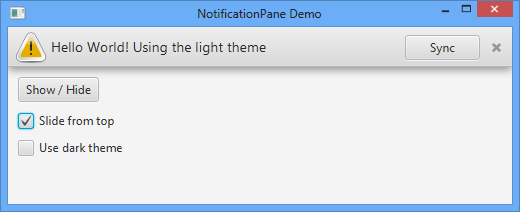
Light theme from bottom: 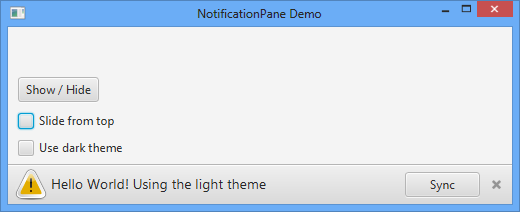
Dark theme from top: 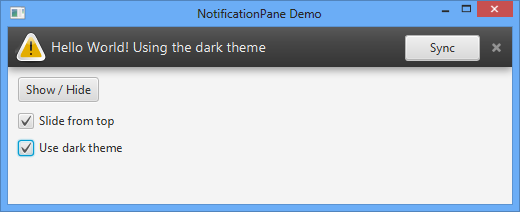
Dark theme from bottom: 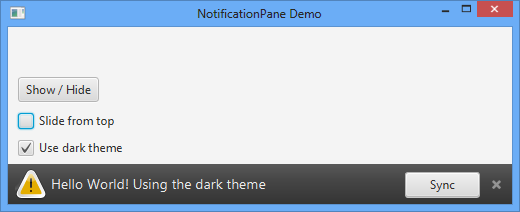
Code Examples
NotificationPane is a conceptually very simple control - you simply create your user interface as you normally would, and then wrap it inside the NotificationPane. You can then show a notification bar on top of your content simply by calling
show()on the notification bar. Here is an example:// Create a WebView WebView webView = new WebView(); // Wrap it inside a NotificationPane NotificationPane notificationPane = new NotificationPane(webView); // and put the NotificationPane inside a Tab Tab tab1 = new Tab("Tab 1"); tab1.setContent(notificationPane); // and the Tab inside a TabPane. We just have one tab here, but of course // you can have more! TabPane tabPane = new TabPane(); tabPane.getTabs().addAll(tab1);Now that the notification pane is installed inside the tab, at some point later in you application lifecycle, you can do something like the following to have the notification bar slide into view:
notificationPane.setText("Do you want to save your password?"); notificationPane.getActions().add(new AbstractAction("Save Password") { public void execute(ActionEvent ae) { // do save... // then hide... notificationPane.hide(); } }- See Also:
Action
-
-
Property Summary
All Methods Instance Methods Concrete Methods Type Property and Description javafx.beans.property.BooleanPropertycloseButtonVisibleA property representing whether the close button in theNotificationPaneshould be visible or not.javafx.beans.property.ObjectProperty<javafx.scene.Node>contentThe content property represents what is shown in the scene that is not within the notification bar.javafx.beans.property.ObjectProperty<javafx.scene.Node>graphicThe graphic property represents theNodeto show within the popup notification bar that appears on top of thecontentthat is within the NotificationPane.javafx.beans.property.ObjectProperty<javafx.event.EventHandler<javafx.event.Event>>onHiddenjavafx.beans.property.ObjectProperty<javafx.event.EventHandler<javafx.event.Event>>onHidingjavafx.beans.property.ObjectProperty<javafx.event.EventHandler<javafx.event.Event>>onShowingjavafx.beans.property.ObjectProperty<javafx.event.EventHandler<javafx.event.Event>>onShownjavafx.beans.property.BooleanPropertyshowFromTopA property representing whether the notification bar should appear from the top or the bottom of the NotificationPane area.javafx.beans.property.ReadOnlyBooleanPropertyshowingA read-only property that represents whether the notification bar popup should be showing to the user or not.javafx.beans.property.StringPropertytextThe text property represents the text to show within the popup notification bar that appears on top of thecontentthat is within the NotificationPane.-
Properties inherited from class javafx.scene.control.Control
contextMenu, skinClassName, skin, tooltip
-
Properties inherited from class javafx.scene.layout.Region
background, border, cacheShape, centerShape, height, insets, maxHeight, maxWidth, minHeight, minWidth, opaqueInsets, padding, prefHeight, prefWidth, scaleShape, shape, snapToPixel, width
-
Properties inherited from class javafx.scene.Node
accessibleHelp, accessibleRoleDescription, accessibleRole, accessibleText, blendMode, boundsInLocal, boundsInParent, cacheHint, cache, clip, cursor, depthTest, disabled, disable, effectiveNodeOrientation, effect, eventDispatcher, focused, focusTraversable, hover, id, impl_showMnemonics, impl_treeVisible, inputMethodRequests, layoutBounds, layoutX, layoutY, localToParentTransform, localToSceneTransform, managed, mouseTransparent, nodeOrientation, onContextMenuRequested, onDragDetected, onDragDone, onDragDropped, onDragEntered, onDragExited, onDragOver, onInputMethodTextChanged, onKeyPressed, onKeyReleased, onKeyTyped, onMouseClicked, onMouseDragEntered, onMouseDragExited, onMouseDragged, onMouseDragOver, onMouseDragReleased, onMouseEntered, onMouseExited, onMouseMoved, onMousePressed, onMouseReleased, onRotate, onRotationFinished, onRotationStarted, onScrollFinished, onScroll, onScrollStarted, onSwipeDown, onSwipeLeft, onSwipeRight, onSwipeUp, onTouchMoved, onTouchPressed, onTouchReleased, onTouchStationary, onZoomFinished, onZoom, onZoomStarted, opacity, parent, pickOnBounds, pressed, rotate, rotationAxis, scaleX, scaleY, scaleZ, scene, style, translateX, translateY, translateZ, visible
-
-
Field Summary
Fields Modifier and Type Field and Description static javafx.event.EventType<javafx.event.Event>ON_HIDDENCalled when the NotificationPane is hidden.static javafx.event.EventType<javafx.event.Event>ON_HIDINGCalled when the NotificationPane will be hidden.static javafx.event.EventType<javafx.event.Event>ON_SHOWINGCalled when the NotificationPane will be shown.static javafx.event.EventType<javafx.event.Event>ON_SHOWNCalled when the NotificationPane shows.static java.lang.StringSTYLE_CLASS_DARKStatic fields
-
Constructor Summary
Constructors Constructor and Description NotificationPane()NotificationPane(javafx.scene.Node content)
-
Method Summary
All Methods Instance Methods Concrete Methods Modifier and Type Method and Description javafx.beans.property.BooleanPropertycloseButtonVisibleProperty()A property representing whether the close button in theNotificationPaneshould be visible or not.javafx.beans.property.ObjectProperty<javafx.scene.Node>contentProperty()The content property represents what is shown in the scene that is not within the notification bar.protected javafx.scene.control.Skin<?>createDefaultSkin()javafx.collections.ObservableList<Action>getActions()Observable list of actions used for the actions area of the notification bar.javafx.scene.NodegetContent()javafx.scene.NodegetGraphic()javafx.event.EventHandler<javafx.event.Event>getOnHidden()Gets the value of the property onHidden.javafx.event.EventHandler<javafx.event.Event>getOnHiding()Gets the value of the property onHiding.javafx.event.EventHandler<javafx.event.Event>getOnShowing()Gets the value of the property onShowing.javafx.event.EventHandler<javafx.event.Event>getOnShown()Gets the value of the property onShown.java.lang.StringgetText()java.lang.StringgetUserAgentStylesheet()protected java.lang.StringgetUserAgentStylesheet(java.lang.Class<?> clazz, java.lang.String fileName)A helper method that ensures that the resource based lookup of the user agent stylesheet only happens once.javafx.beans.property.ObjectProperty<javafx.scene.Node>graphicProperty()The graphic property represents theNodeto show within the popup notification bar that appears on top of thecontentthat is within the NotificationPane.voidhide()Call this to make the notification bar disappear from thecontentof thisNotificationPane.booleanisCloseButtonVisible()booleanisShowFromTop()booleanisShowing()javafx.beans.property.ObjectProperty<javafx.event.EventHandler<javafx.event.Event>>onHiddenProperty()javafx.beans.property.ObjectProperty<javafx.event.EventHandler<javafx.event.Event>>onHidingProperty()javafx.beans.property.ObjectProperty<javafx.event.EventHandler<javafx.event.Event>>onShowingProperty()javafx.beans.property.ObjectProperty<javafx.event.EventHandler<javafx.event.Event>>onShownProperty()voidsetCloseButtonVisible(boolean value)Sets whether the close button inNotificationPaneshould be visible.voidsetContent(javafx.scene.Node value)Set the content to be shown in the scene, that is not within the notification bar.voidsetGraphic(javafx.scene.Node value)Sets theNodeto show within the popup notification bar.voidsetOnHidden(javafx.event.EventHandler<javafx.event.Event> value)Called just after theNotificationPanehas been hidden.voidsetOnHiding(javafx.event.EventHandler<javafx.event.Event> value)Called just prior to theNotificationPanebeing hidden.voidsetOnShowing(javafx.event.EventHandler<javafx.event.Event> value)Called just prior to theNotificationPanebeing shown.voidsetOnShown(javafx.event.EventHandler<javafx.event.Event> value)Called just after theNotificationPaneis shown.voidsetShowFromTop(boolean value)Sets whether the notification bar should appear from the top or the bottom of the NotificationPane area.voidsetText(java.lang.String value)Sets the text to show within the popup notification bar that appears on top of thecontent.voidshow()Call this to make the notification bar appear on top of thecontentof thisNotificationPane.voidshow(java.lang.String text)voidshow(java.lang.String text, javafx.scene.Node graphic)voidshow(java.lang.String text, javafx.scene.Node graphic, Action... actions)javafx.beans.property.BooleanPropertyshowFromTopProperty()A property representing whether the notification bar should appear from the top or the bottom of the NotificationPane area.javafx.beans.property.ReadOnlyBooleanPropertyshowingProperty()A read-only property that represents whether the notification bar popup should be showing to the user or not.javafx.beans.property.StringPropertytextProperty()The text property represents the text to show within the popup notification bar that appears on top of thecontentthat is within the NotificationPane.-
Methods inherited from class javafx.scene.control.Control
computeMaxHeight, computeMaxWidth, computeMinHeight, computeMinWidth, computePrefHeight, computePrefWidth, contextMenuProperty, executeAccessibleAction, getBaselineOffset, getClassCssMetaData, getContextMenu, getControlCssMetaData, getCssMetaData, getSkin, getTooltip, impl_cssGetFocusTraversableInitialValue, impl_processCSS, isResizable, layoutChildren, queryAccessibleAttribute, setContextMenu, setSkin, setTooltip, skinClassNameProperty, skinProperty, tooltipProperty
-
Methods inherited from class javafx.scene.layout.Region
backgroundProperty, borderProperty, cacheShapeProperty, centerShapeProperty, getBackground, getBorder, getHeight, getInsets, getMaxHeight, getMaxWidth, getMinHeight, getMinWidth, getOpaqueInsets, getPadding, getPrefHeight, getPrefWidth, getShape, getWidth, heightProperty, impl_computeContains, impl_computeGeomBounds, impl_computeLayoutBounds, impl_createPeer, impl_notifyLayoutBoundsChanged, impl_pickNodeLocal, impl_updatePeer, insetsProperty, isCacheShape, isCenterShape, isScaleShape, isSnapToPixel, layoutInArea, layoutInArea, layoutInArea, layoutInArea, maxHeight, maxHeightProperty, maxWidth, maxWidthProperty, minHeight, minHeightProperty, minWidth, minWidthProperty, opaqueInsetsProperty, paddingProperty, positionInArea, positionInArea, prefHeight, prefHeightProperty, prefWidth, prefWidthProperty, resize, scaleShapeProperty, setBackground, setBorder, setCacheShape, setCenterShape, setHeight, setMaxHeight, setMaxSize, setMaxWidth, setMinHeight, setMinSize, setMinWidth, setOpaqueInsets, setPadding, setPrefHeight, setPrefSize, setPrefWidth, setScaleShape, setShape, setSnapToPixel, setWidth, shapeProperty, snappedBottomInset, snappedLeftInset, snappedRightInset, snappedTopInset, snapPosition, snapSize, snapSpace, snapToPixelProperty, widthProperty
-
Methods inherited from class javafx.scene.Parent
getChildren, getChildrenUnmodifiable, getImpl_traversalEngine, getManagedChildren, getStylesheets, impl_getAllParentStylesheets, impl_processMXNode, impl_traversalEngineProperty, isNeedsLayout, layout, lookup, needsLayoutProperty, requestLayout, requestParentLayout, setImpl_traversalEngine, setNeedsLayout, updateBounds
-
Methods inherited from class javafx.scene.Node
accessibleHelpProperty, accessibleRoleDescriptionProperty, accessibleRoleProperty, accessibleTextProperty, addEventFilter, addEventHandler, applyCss, autosize, blendModeProperty, boundsInLocalProperty, boundsInParentProperty, buildEventDispatchChain, cacheHintProperty, cacheProperty, clipProperty, computeAreaInScreen, contains, contains, containsBounds, cursorProperty, depthTestProperty, disabledProperty, disableProperty, effectiveNodeOrientationProperty, effectProperty, eventDispatcherProperty, fireEvent, focusedProperty, focusTraversableProperty, getAccessibleHelp, getAccessibleRole, getAccessibleRoleDescription, getAccessibleText, getBlendMode, getBoundsInLocal, getBoundsInParent, getCacheHint, getClip, getContentBias, getCursor, getDepthTest, getEffect, getEffectiveNodeOrientation, getEventDispatcher, getId, getInputMethodRequests, getLayoutBounds, getLayoutX, getLayoutY, getLocalToParentTransform, getLocalToSceneTransform, getNodeOrientation, getOnContextMenuRequested, getOnDragDetected, getOnDragDone, getOnDragDropped, getOnDragEntered, getOnDragExited, getOnDragOver, getOnInputMethodTextChanged, getOnKeyPressed, getOnKeyReleased, getOnKeyTyped, getOnMouseClicked, getOnMouseDragEntered, getOnMouseDragExited, getOnMouseDragged, getOnMouseDragOver, getOnMouseDragReleased, getOnMouseEntered, getOnMouseExited, getOnMouseMoved, getOnMousePressed, getOnMouseReleased, getOnRotate, getOnRotationFinished, getOnRotationStarted, getOnScroll, getOnScrollFinished, getOnScrollStarted, getOnSwipeDown, getOnSwipeLeft, getOnSwipeRight, getOnSwipeUp, getOnTouchMoved, getOnTouchPressed, getOnTouchReleased, getOnTouchStationary, getOnZoom, getOnZoomFinished, getOnZoomStarted, getOpacity, getParent, getProperties, getPseudoClassStates, getRotate, getRotationAxis, getScaleX, getScaleY, getScaleZ, getScene, getStyle, getStyleableParent, getStyleClass, getTransforms, getTranslateX, getTranslateY, getTranslateZ, getTypeSelector, getUserData, hasProperties, hoverProperty, idProperty, impl_clearDirty, impl_computeIntersects, impl_cssGetCursorInitialValue, impl_findStyles, impl_geomChanged, impl_getLeafTransform, impl_getMatchingStyles, impl_getPeer, impl_getPivotX, impl_getPivotY, impl_getPivotZ, impl_getStyleMap, impl_hasTransforms, impl_intersects, impl_intersectsBounds, impl_isDirty, impl_isDirtyEmpty, impl_isShowMnemonics, impl_isTreeVisible, impl_layoutBoundsChanged, impl_markDirty, impl_pickNode, impl_processCSS, impl_reapplyCSS, impl_setShowMnemonics, impl_setStyleMap, impl_showMnemonicsProperty, impl_syncPeer, impl_transformsChanged, impl_traverse, impl_treeVisibleProperty, inputMethodRequestsProperty, intersects, intersects, isCache, isDisable, isDisabled, isFocused, isFocusTraversable, isHover, isManaged, isMouseTransparent, isPickOnBounds, isPressed, isVisible, layoutBoundsProperty, layoutXProperty, layoutYProperty, localToParent, localToParent, localToParent, localToParent, localToParent, localToParentTransformProperty, localToScene, localToScene, localToScene, localToScene, localToScene, localToScene, localToScene, localToScene, localToScene, localToScene, localToSceneTransformProperty, localToScreen, localToScreen, localToScreen, localToScreen, localToScreen, lookupAll, managedProperty, mouseTransparentProperty, nodeOrientationProperty, notifyAccessibleAttributeChanged, onContextMenuRequestedProperty, onDragDetectedProperty, onDragDoneProperty, onDragDroppedProperty, onDragEnteredProperty, onDragExitedProperty, onDragOverProperty, onInputMethodTextChangedProperty, onKeyPressedProperty, onKeyReleasedProperty, onKeyTypedProperty, onMouseClickedProperty, onMouseDragEnteredProperty, onMouseDragExitedProperty, onMouseDraggedProperty, onMouseDragOverProperty, onMouseDragReleasedProperty, onMouseEnteredProperty, onMouseExitedProperty, onMouseMovedProperty, onMousePressedProperty, onMouseReleasedProperty, onRotateProperty, onRotationFinishedProperty, onRotationStartedProperty, onScrollFinishedProperty, onScrollProperty, onScrollStartedProperty, onSwipeDownProperty, onSwipeLeftProperty, onSwipeRightProperty, onSwipeUpProperty, onTouchMovedProperty, onTouchPressedProperty, onTouchReleasedProperty, onTouchStationaryProperty, onZoomFinishedProperty, onZoomProperty, onZoomStartedProperty, opacityProperty, parentProperty, parentToLocal, parentToLocal, parentToLocal, parentToLocal, parentToLocal, pickOnBoundsProperty, pressedProperty, pseudoClassStateChanged, relocate, removeEventFilter, removeEventHandler, requestFocus, resizeRelocate, rotateProperty, rotationAxisProperty, scaleXProperty, scaleYProperty, scaleZProperty, sceneProperty, sceneToLocal, sceneToLocal, sceneToLocal, sceneToLocal, sceneToLocal, sceneToLocal, sceneToLocal, sceneToLocal, screenToLocal, screenToLocal, screenToLocal, setAccessibleHelp, setAccessibleRole, setAccessibleRoleDescription, setAccessibleText, setBlendMode, setCache, setCacheHint, setClip, setCursor, setDepthTest, setDisable, setDisabled, setEffect, setEventDispatcher, setEventHandler, setFocused, setFocusTraversable, setHover, setId, setInputMethodRequests, setLayoutX, setLayoutY, setManaged, setMouseTransparent, setNodeOrientation, setOnContextMenuRequested, setOnDragDetected, setOnDragDone, setOnDragDropped, setOnDragEntered, setOnDragExited, setOnDragOver, setOnInputMethodTextChanged, setOnKeyPressed, setOnKeyReleased, setOnKeyTyped, setOnMouseClicked, setOnMouseDragEntered, setOnMouseDragExited, setOnMouseDragged, setOnMouseDragOver, setOnMouseDragReleased, setOnMouseEntered, setOnMouseExited, setOnMouseMoved, setOnMousePressed, setOnMouseReleased, setOnRotate, setOnRotationFinished, setOnRotationStarted, setOnScroll, setOnScrollFinished, setOnScrollStarted, setOnSwipeDown, setOnSwipeLeft, setOnSwipeRight, setOnSwipeUp, setOnTouchMoved, setOnTouchPressed, setOnTouchReleased, setOnTouchStationary, setOnZoom, setOnZoomFinished, setOnZoomStarted, setOpacity, setPickOnBounds, setPressed, setRotate, setRotationAxis, setScaleX, setScaleY, setScaleZ, setStyle, setTranslateX, setTranslateY, setTranslateZ, setUserData, setVisible, snapshot, snapshot, startDragAndDrop, startFullDrag, styleProperty, toBack, toFront, toString, translateXProperty, translateYProperty, translateZProperty, usesMirroring, visibleProperty
-
-
-
-
Property Detail
-
content
public final javafx.beans.property.ObjectProperty<javafx.scene.Node> contentProperty
The content property represents what is shown in the scene that is not within the notification bar. In other words, it is what the notification bar should appear on top of. For example, in the scenario where you are using aWebViewto show to the user websites, and you want to popup up a notification bar to save a password, the content would be theWebView. Refer to theNotificationPaneclass documentation for more details.- Returns:
- A property representing the content of this NotificationPane.
-
text
public final javafx.beans.property.StringProperty textProperty
The text property represents the text to show within the popup notification bar that appears on top of thecontentthat is within the NotificationPane.- See Also:
getText(),setText(String)
-
graphic
public final javafx.beans.property.ObjectProperty<javafx.scene.Node> graphicProperty
The graphic property represents theNodeto show within the popup notification bar that appears on top of thecontentthat is within the NotificationPane. Despite the term 'graphic', this can be an arbitrarily complex scenegraph in its own right.- See Also:
getGraphic(),setGraphic(Node)
-
showing
public final javafx.beans.property.ReadOnlyBooleanProperty showingProperty
A read-only property that represents whether the notification bar popup should be showing to the user or not. To toggle visibility, use theshow()andhide()methods.- See Also:
isShowing()
-
showFromTop
public final javafx.beans.property.BooleanProperty showFromTopProperty
A property representing whether the notification bar should appear from the top or the bottom of the NotificationPane area. By default it will appear from the top, but this can be changed by setting this property to false.- See Also:
isShowFromTop(),setShowFromTop(boolean)
-
onShowing
public final javafx.beans.property.ObjectProperty<javafx.event.EventHandler<javafx.event.Event>> onShowingProperty
- See Also:
getOnShowing(),setOnShowing(EventHandler)
-
onShown
public final javafx.beans.property.ObjectProperty<javafx.event.EventHandler<javafx.event.Event>> onShownProperty
- See Also:
getOnShown(),setOnShown(EventHandler)
-
onHiding
public final javafx.beans.property.ObjectProperty<javafx.event.EventHandler<javafx.event.Event>> onHidingProperty
- See Also:
getOnHiding(),setOnHiding(EventHandler)
-
onHidden
public final javafx.beans.property.ObjectProperty<javafx.event.EventHandler<javafx.event.Event>> onHiddenProperty
- See Also:
getOnHidden(),setOnHidden(EventHandler)
-
closeButtonVisible
public final javafx.beans.property.BooleanProperty closeButtonVisibleProperty
A property representing whether the close button in theNotificationPaneshould be visible or not. By default it will appear but this can be changed by setting this property to false.
-
-
Field Detail
-
STYLE_CLASS_DARK
public static final java.lang.String STYLE_CLASS_DARK
Static fields- See Also:
- Constant Field Values
-
ON_SHOWING
public static final javafx.event.EventType<javafx.event.Event> ON_SHOWING
Called when the NotificationPane will be shown.
-
ON_SHOWN
public static final javafx.event.EventType<javafx.event.Event> ON_SHOWN
Called when the NotificationPane shows.
-
ON_HIDING
public static final javafx.event.EventType<javafx.event.Event> ON_HIDING
Called when the NotificationPane will be hidden.
-
ON_HIDDEN
public static final javafx.event.EventType<javafx.event.Event> ON_HIDDEN
Called when the NotificationPane is hidden.
-
-
Constructor Detail
-
NotificationPane
public NotificationPane()
-
NotificationPane
public NotificationPane(javafx.scene.Node content)
Creates an instance of NotificationPane with thecontentproperty set, but notextorgraphicproperty set, and noactionsspecified.- Parameters:
content- The content to show in the NotificationPane behind where the notification bar will appear, that is, the content will notappear in the notification bar.
-
-
Method Detail
-
createDefaultSkin
protected javafx.scene.control.Skin<?> createDefaultSkin()
- Overrides:
createDefaultSkinin classjavafx.scene.control.Control
-
getUserAgentStylesheet
public java.lang.String getUserAgentStylesheet()
- Overrides:
getUserAgentStylesheetin classjavafx.scene.layout.Region
-
contentProperty
public final javafx.beans.property.ObjectProperty<javafx.scene.Node> contentProperty()
The content property represents what is shown in the scene that is not within the notification bar. In other words, it is what the notification bar should appear on top of. For example, in the scenario where you are using aWebViewto show to the user websites, and you want to popup up a notification bar to save a password, the content would be theWebView. Refer to theNotificationPaneclass documentation for more details.- Returns:
- A property representing the content of this NotificationPane.
-
setContent
public final void setContent(javafx.scene.Node value)
Set the content to be shown in the scene, that is not within the notification bar.- Parameters:
value-
-
getContent
public final javafx.scene.Node getContent()
- Returns:
- The content shown in the scene.
-
textProperty
public final javafx.beans.property.StringProperty textProperty()
The text property represents the text to show within the popup notification bar that appears on top of thecontentthat is within the NotificationPane.- See Also:
getText(),setText(String)
-
setText
public final void setText(java.lang.String value)
Sets the text to show within the popup notification bar that appears on top of thecontent.- Parameters:
value-
-
getText
public final java.lang.String getText()
- Returns:
- the text showing within the popup
notification bar that appears on top of the
content.
-
graphicProperty
public final javafx.beans.property.ObjectProperty<javafx.scene.Node> graphicProperty()
The graphic property represents theNodeto show within the popup notification bar that appears on top of thecontentthat is within the NotificationPane. Despite the term 'graphic', this can be an arbitrarily complex scenegraph in its own right.- See Also:
getGraphic(),setGraphic(Node)
-
setGraphic
public final void setGraphic(javafx.scene.Node value)
Sets theNodeto show within the popup notification bar.- Parameters:
value-
-
getGraphic
public final javafx.scene.Node getGraphic()
- Returns:
- the
Nodeto show within the popup notification bar.
-
showingProperty
public final javafx.beans.property.ReadOnlyBooleanProperty showingProperty()
A read-only property that represents whether the notification bar popup should be showing to the user or not. To toggle visibility, use theshow()andhide()methods.- See Also:
isShowing()
-
isShowing
public final boolean isShowing()
- Returns:
- whether the notification bar is currently showing.
-
showFromTopProperty
public final javafx.beans.property.BooleanProperty showFromTopProperty()
A property representing whether the notification bar should appear from the top or the bottom of the NotificationPane area. By default it will appear from the top, but this can be changed by setting this property to false.- See Also:
isShowFromTop(),setShowFromTop(boolean)
-
setShowFromTop
public final void setShowFromTop(boolean value)
Sets whether the notification bar should appear from the top or the bottom of the NotificationPane area.- Parameters:
value-
-
isShowFromTop
public final boolean isShowFromTop()
- Returns:
- whether the notification bar is appearing from the top or the bottom of the NotificationPane area.
-
onShowingProperty
public final javafx.beans.property.ObjectProperty<javafx.event.EventHandler<javafx.event.Event>> onShowingProperty()
- See Also:
getOnShowing(),setOnShowing(EventHandler)
-
setOnShowing
public final void setOnShowing(javafx.event.EventHandler<javafx.event.Event> value)
Called just prior to theNotificationPanebeing shown.
-
getOnShowing
public final javafx.event.EventHandler<javafx.event.Event> getOnShowing()
Gets the value of the property onShowing.
-
onShownProperty
public final javafx.beans.property.ObjectProperty<javafx.event.EventHandler<javafx.event.Event>> onShownProperty()
- See Also:
getOnShown(),setOnShown(EventHandler)
-
setOnShown
public final void setOnShown(javafx.event.EventHandler<javafx.event.Event> value)
Called just after theNotificationPaneis shown.
-
getOnShown
public final javafx.event.EventHandler<javafx.event.Event> getOnShown()
Gets the value of the property onShown.
-
onHidingProperty
public final javafx.beans.property.ObjectProperty<javafx.event.EventHandler<javafx.event.Event>> onHidingProperty()
- See Also:
getOnHiding(),setOnHiding(EventHandler)
-
setOnHiding
public final void setOnHiding(javafx.event.EventHandler<javafx.event.Event> value)
Called just prior to theNotificationPanebeing hidden.
-
getOnHiding
public final javafx.event.EventHandler<javafx.event.Event> getOnHiding()
Gets the value of the property onHiding.
-
onHiddenProperty
public final javafx.beans.property.ObjectProperty<javafx.event.EventHandler<javafx.event.Event>> onHiddenProperty()
- See Also:
getOnHidden(),setOnHidden(EventHandler)
-
setOnHidden
public final void setOnHidden(javafx.event.EventHandler<javafx.event.Event> value)
Called just after theNotificationPanehas been hidden.
-
getOnHidden
public final javafx.event.EventHandler<javafx.event.Event> getOnHidden()
Gets the value of the property onHidden.
-
closeButtonVisibleProperty
public final javafx.beans.property.BooleanProperty closeButtonVisibleProperty()
A property representing whether the close button in theNotificationPaneshould be visible or not. By default it will appear but this can be changed by setting this property to false.
-
setCloseButtonVisible
public final void setCloseButtonVisible(boolean value)
Sets whether the close button inNotificationPaneshould be visible.- Parameters:
value-
-
isCloseButtonVisible
public final boolean isCloseButtonVisible()
- Returns:
- whether the close button in
NotificationPaneis visible.
-
getActions
public final javafx.collections.ObservableList<Action> getActions()
Observable list of actions used for the actions area of the notification bar. Modifying the contents of this list will change the actions available to the user.- Returns:
- The
ObservableListof actions available to the user.
-
show
public void show()
Call this to make the notification bar appear on top of thecontentof thisNotificationPane. If the notification bar is already showing this will be a no-op.
-
show
public void show(java.lang.String text)
Shows the NotificationPane with thecontentandtextproperty set, but nographicproperty set, and noactionsspecified.- Parameters:
text- The text to show in the notification pane.
-
show
public void show(java.lang.String text,
                 javafx.scene.Node graphic)
Shows the NotificationPane with thecontent,textandgraphicproperties set, but noactionsspecified.- Parameters:
text- The text to show in the notification pane.graphic- The node to show in the notification pane.
-
show
public void show(java.lang.String text,
                 javafx.scene.Node graphic,
                 Action... actions)
Shows the NotificationPane with thecontent,textandgraphicproperty set, and the provided actions copied into theactionslist.- Parameters:
text- The text to show in the notification pane.graphic- The node to show in the notification pane.actions- The actions to show in the notification pane.
-
hide
public void hide()
Call this to make the notification bar disappear from thecontentof thisNotificationPane. If the notification bar is already hidden this will be a no-op.
-
getUserAgentStylesheet
protected final java.lang.String getUserAgentStylesheet(java.lang.Class<?> clazz,
                                                        java.lang.String fileName)
A helper method that ensures that the resource based lookup of the user agent stylesheet only happens once. Caches the external form of the resource.- Parameters:
clazz- the class used for the resource lookupfileName- the name of the user agent stylesheet- Returns:
- the external form of the user agent stylesheet (the path)
-
-