- java.lang.Object
-
- org.controlsfx.control.Notifications
-
public class Notifications
extends java.lang.Object
An API to show popup notification messages to the user in the corner of their screen, unlike theNotificationPanewhich shows notification messages within your application itself.Screenshot
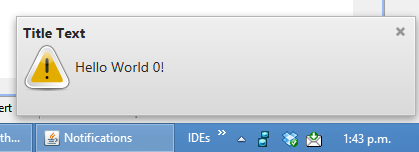
The following screenshot shows a sample notification rising from the bottom-right corner of my screen:
Code Example:
To create the notification shown in the screenshot, simply do the following:
 Notifications.create()
              .title("Title Text")
              .text("Hello World 0!")
              .showWarning();
When there are too many notifications on the screen, one can opt to collapse the notifications into a single notification using
threshold(int, Notifications).Notifications.create() .title("Title Text") .text("Hello World 0!") .threshold(3, Notifications.create().title("Collapsed Notification")) .showWarning();
-
-
Method Summary
All Methods Static Methods Instance Methods Concrete Methods Modifier and Type Method and Description Notificationsaction(Action... actions)Specify the actions that should be shown in the notification as buttons.static Notificationscreate()Call this to begin the process of building a notification to show.NotificationsdarkStyle()Specify that the notification should use the built-in dark styling, rather than the default 'modena' notification style (which is a light-gray).Notificationsgraphic(javafx.scene.Node graphic)Specify the graphic to show in the notification.NotificationshideAfter(javafx.util.Duration duration)Specify the duration that the notification should show, after which it will be hidden.NotificationshideCloseButton()Specify that the close button in the top-right corner of the notification should not be shown.NotificationsonAction(javafx.event.EventHandler<javafx.event.ActionEvent> onAction)Specify what to do when the user clicks on the notification (in addition to the notification hiding, which happens whenever the notification is clicked on).Notificationsowner(java.lang.Object owner)The dialog window owner - which can beScreen,WindoworNode.Notificationsposition(javafx.geometry.Pos position)Specify the position of the notification on screen, by default it isbottom-right.voidshow()Instructs the notification to be shown.voidshowConfirm()Instructs the notification to be shown, and that it should use the built-in 'confirm' graphic.voidshowError()Instructs the notification to be shown, and that it should use the built-in 'error' graphic.voidshowInformation()Instructs the notification to be shown, and that it should use the built-in 'information' graphic.voidshowWarning()Instructs the notification to be shown, and that it should use the built-in 'warning' graphic.Notificationstext(java.lang.String text)Specify the text to show in the notification.Notificationsthreshold(int threshold, Notifications thresholdNotification)Collapses all the current notifications into a single notification when the number of notifications exceed the threshold limit.Notificationstitle(java.lang.String title)Specify the title to show in the notification.
-
-
-
Method Detail
-
create
public static Notifications create()
Call this to begin the process of building a notification to show.
-
text
public Notifications text(java.lang.String text)
Specify the text to show in the notification.
-
title
public Notifications title(java.lang.String title)
Specify the title to show in the notification.
-
graphic
public Notifications graphic(javafx.scene.Node graphic)
Specify the graphic to show in the notification.
-
position
public Notifications position(javafx.geometry.Pos position)
Specify the position of the notification on screen, by default it isbottom-right.
-
owner
public Notifications owner(java.lang.Object owner)
The dialog window owner - which can beScreen,WindoworNode. If specified, the notifications will be inside the owner, otherwise the notifications will be shown within the whole primary (default) screen.
-
hideAfter
public Notifications hideAfter(javafx.util.Duration duration)
Specify the duration that the notification should show, after which it will be hidden.
-
onAction
public Notifications onAction(javafx.event.EventHandler<javafx.event.ActionEvent> onAction)
Specify what to do when the user clicks on the notification (in addition to the notification hiding, which happens whenever the notification is clicked on).
-
darkStyle
public Notifications darkStyle()
Specify that the notification should use the built-in dark styling, rather than the default 'modena' notification style (which is a light-gray).
-
hideCloseButton
public Notifications hideCloseButton()
Specify that the close button in the top-right corner of the notification should not be shown.
-
action
public Notifications action(Action... actions)
Specify the actions that should be shown in the notification as buttons.
-
threshold
public Notifications threshold(int threshold,
                               Notifications thresholdNotification)
Collapses all the current notifications into a single notification when the number of notifications exceed the threshold limit. A value of zero will disable the threshold behavior.- Parameters:
threshold- The number of notifications to show before they can be collapsed into a single notification.thresholdNotification- Thenotificationto show when threshold is reached.
-
showWarning
public void showWarning()
Instructs the notification to be shown, and that it should use the built-in 'warning' graphic.
-
showInformation
public void showInformation()
Instructs the notification to be shown, and that it should use the built-in 'information' graphic.
-
showError
public void showError()
Instructs the notification to be shown, and that it should use the built-in 'error' graphic.
-
showConfirm
public void showConfirm()
Instructs the notification to be shown, and that it should use the built-in 'confirm' graphic.
-
show
public void show()
Instructs the notification to be shown.
-
-