- java.lang.Object
-
- org.controlsfx.control.spreadsheet.SpreadsheetCellBase
-
- All Implemented Interfaces:
- javafx.event.EventTarget, SpreadsheetCell
public class SpreadsheetCellBase
extends java.lang.Object
implements SpreadsheetCell, javafx.event.EventTarget
The SpreadsheetCells serve as model for theSpreadsheetView.
You will provide them when constructing aGrid.
SpreadsheetCell Types
Each SpreadsheetCell has its ownSpreadsheetCellTypewhich has its ownSpreadsheetCellEditorin order to control very closely the possible modifications.Different
SpreadsheetCellTypesare available depending on the data you want to represent in yourSpreadsheetView. You can use the different static method provided inSpreadsheetCellTypein order to create the specialized SpreadsheetCell that suits your need.
If you want to create a SpreadsheetCell of your own, you simply have to use one of the provided constructor. Usually you will let your
SpreadsheetCellTypecreate the cells. For exampleSpreadsheetCellType.StringType.createCell(int, int, int, int, java.lang.String). You will also have to provide a customSpreadsheetCellEditor.Configuration
You will have to indicate the coordinates of the cell together with therowandcolumnspan. You can specify if you want the cell to be editable or not usingsetEditable(boolean). Be advised that a cell with a rowSpan means that the cell will replace all the cells situated in the rowSpan range. Same with the column span.
So the best way to handle spanning is to fill your grid with unique cells, and then call at the endGridBase.spanColumn(int, int, int)orGridBase.spanRow(int, int, int). These methods will handle the span for you.
Format
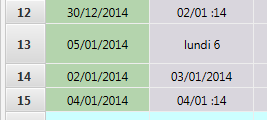
Your cell can have its very own format. If you want to display some dates with different format, you just have to create a uniqueSpreadsheetCellTypeand then specify for each cell their format withsetFormat(String). You will then have the guaranty that all your cells will have a LocalDate as a value, but the value will be displayed differently for each cell. This will also guaranty that copy/paste and other operation will be compatible since every cell will share the sameSpreadsheetCellType.
Here an example :
 SpreadsheetCell cell = SpreadsheetCellType.DATE.createCell(row, column, rowSpan, colSpan,
         LocalDate.now().plusDays((int) (Math.random() * 10))); // Random value
 // given here
 final double random = Math.random();
 if (random < 0.25) {
     cell.setFormat("EEEE d");
 } else if (random < 0.5) {
     cell.setFormat("dd/MM :YY");
 } else {
     cell.setFormat("dd/MM/YYYY");
 }
Popup
Each cell can display aPopupwhen clicked. This is useful when some non editable cell wants to display several actions to take on the grid. This feature is completely different from theFilter. Filters are shown on one particular row whereas popup can be added to every cell.Graphic
Each cell can have a graphic to display next to the text in the cells. Just use thesetGraphic(Node)in order to specify the graphic you want. If you specify anImageView, the SpreadsheetView will try to resize it in order to fit the space available in the cell. For example :cell.setGraphic(new ImageView(new Image(getClass().getResourceAsStream("icons/exclamation.png"))));If you only want to only provide Graphics for visible cells (for example aWebView), you can togglesetCellGraphic(boolean)and provide the graphics with the factory inSpreadsheetView.setCellGraphicFactory(org.controlsfx.control.spreadsheet.CellGraphicFactory).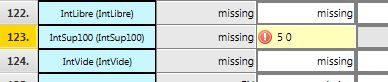
In addition to that, you can also specify another graphic property to your cell withactivateCorner(org.controlsfx.control.spreadsheet.SpreadsheetCell.CornerPosition). This allow you to activate or deactivate some graphics on the cell in every corner. Right now it's a little red triangle but you can modify this in your CSS by using the "cell-corner" style class..cell-corner.top-left{ -fx-background-color: red; -fx-shape : "M 0 0 L 1 0 L 0 1 z"; }
You can also customize the tooltip of your SpreadsheetCell by specifying one withsetTooltip(java.lang.String).Style with CSS
You can style your cell by specifying some styleClass withgetStyleClass(). You just have to create and custom that class in your CSS stylesheet associated with yourSpreadsheetView. Also note that allSpreadsheetCellhave a "spreadsheet-cell" styleClass added by default. Here is a example :
cell.getStyleClass().add("row_header");And in the CSS:.spreadsheet-cell.row_header{ -fx-background-color: #b4d4ad ; -fx-background-insets: 0, 0 1 1 0; -fx-alignment: center; }Examples
Here is an example that uses all the pre-builtSpreadsheetCellTypetypes. The generation is random here so you will want to replace the logic to suit your needs.private SpreadsheetCell<?> generateCell(int row, int column, int rowSpan, int colSpan) { List<String> stringListTextCell = Arrays.asList("Shanghai","Paris","New York City","Bangkok","Singapore","Johannesburg","Berlin","Wellington","London","Montreal"); final double random = Math.random(); if (random < 0.10) { List<String> stringList = Arrays.asList("China","France","New Zealand","United States","Germany","Canada"); cell = SpreadsheetCellType.LIST(stringList).createCell(row, column, rowSpan, colSpan, stringList.get((int) (Math.random() * 6))); } else if (random >= 0.10 && random < 0.25) { cell = SpreadsheetCellType.STRING.createCell(row, column, rowSpan, colSpan,stringListTextCell.get((int)(Math.random()*10))); } else if (random >= 0.25 && random < 0.75) { cell = SpreadsheetCellType.DOUBLE.createCell(row, column, rowSpan, colSpan,(double)Math.round((Math.random()*100)*100)/100); } else { cell = SpreadsheetCellType.DATE.createCell(row, column, rowSpan, colSpan, LocalDate.now().plusDays((int)(Math.random()*10))); } return cell; }- See Also:
SpreadsheetView,SpreadsheetCellEditor,SpreadsheetCellType
-
-
Property Summary
All Methods Instance Methods Concrete Methods Type Property and Description javafx.beans.property.StringPropertyformatReturns theStringPropertylinked with the format.javafx.beans.property.ObjectProperty<javafx.scene.Node>graphicReturns theObjectPropertyrepresenting this cell graphic.javafx.beans.property.ObjectProperty<java.lang.Object>itemThe item property represents the currently-set value inside thisSpreadsheetCell.javafx.beans.property.StringPropertystyleA string representation of the CSS style associated with this specific Node.javafx.beans.property.ReadOnlyStringPropertytextReturns the StringProperty of the representation of the value.
-
Nested Class Summary
-
Nested classes/interfaces inherited from interface org.controlsfx.control.spreadsheet.SpreadsheetCell
SpreadsheetCell.CornerPosition
-
-
Field Summary
-
Fields inherited from interface org.controlsfx.control.spreadsheet.SpreadsheetCell
CORNER_EVENT_TYPE, EDITABLE_EVENT_TYPE, WRAP_EVENT_TYPE
-
-
Constructor Summary
Constructors Constructor and Description SpreadsheetCellBase(int row, int column, int rowSpan, int columnSpan)Constructs a SpreadsheetCell with the given configuration.SpreadsheetCellBase(int row, int column, int rowSpan, int columnSpan, SpreadsheetCellType<?> type)Constructs a SpreadsheetCell with the given configuration.
-
Method Summary
All Methods Instance Methods Concrete Methods Modifier and Type Method and Description voidactivateCorner(SpreadsheetCell.CornerPosition position)Activates the givenCornerPositionin order to display a little triangle in the cell.voidaddEventHandler(javafx.event.EventType<javafx.event.Event> eventType, javafx.event.EventHandler<javafx.event.Event> eventHandler)Registers an event handler to this SpreadsheetCell.javafx.event.EventDispatchChainbuildEventDispatchChain(javafx.event.EventDispatchChain tail)voiddeactivateCorner(SpreadsheetCell.CornerPosition position)This deactivates the givenCornerPositionso that no triangle will be shown for this cell.booleanequals(java.lang.Object obj)javafx.beans.property.StringPropertyformatProperty()Returns theStringPropertylinked with the format.SpreadsheetCellTypegetCellType()Returns theSpreadsheetCellTypeof this cell.intgetColumn()Returns the column index of this cell.intgetColumnSpan()Returns how much this cell is spanning in column, 1 means the cell is not spanning.java.lang.StringgetFormat()Returns the format of this cell or an empty string if no format has been specified.javafx.scene.NodegetGraphic()Returns the graphic node associated with this cell.java.lang.ObjectgetItem()Returns the value contained in this cell.java.util.List<java.lang.Object>getOptionsForEditor()If some options cannot be factorized in aSpreadsheetCellTypeand are specific to a cell, you can return them here and theSpreadsheetCellEditorwill receive them.java.util.List<javafx.scene.control.MenuItem>getPopupItems()IfSpreadsheetCell.hasPopup()is set totrue, this method will be called when the user clicks on the cell in order to gather theMenuItemto show in the Popup.intgetRow()Returns the row index of this cell.intgetRowSpan()Returns how much this cell is spanning in row, 1 means the cell is not spanning.java.lang.StringgetStyle()A string representation of the CSS style associated with this specific Node.javafx.collections.ObservableSet<java.lang.String>getStyleClass()Returns anObservableListofStringof all the style class associated with this cell.java.lang.StringgetText()Returns the String representation currently used for display in theSpreadsheetView.java.util.Optional<java.lang.String>getTooltip()Returns the tooltip for this cell.javafx.beans.property.ObjectProperty<javafx.scene.Node>graphicProperty()Returns theObjectPropertyrepresenting this cell graphic.inthashCode()booleanhasPopup()Returns true if this cell needs to display a popup when clicked in order to show someMenuItemlike aMenuButton.booleanisCellGraphic()Returnstrueif this cell contains something particular in its item and aNodegiven by theCellGraphicFactorywill be used to display it.booleanisCornerActivated(SpreadsheetCell.CornerPosition position)Returnstrueif a triangle is displayed in the cell for the givenCornerPosition.booleanisEditable()Returnstrueif this cell can be edited.booleanisWrapText()If a run of text exceeds the width of the Labeled, then this variable indicates whether the text should wrap onto another line.javafx.beans.property.ObjectProperty<java.lang.Object>itemProperty()The item property represents the currently-set value inside thisSpreadsheetCell.booleanmatch(java.lang.Object value)Verifies that the upcoming cell value can be set to the current cell.voidremoveEventHandler(javafx.event.EventType<javafx.event.Event> eventType, javafx.event.EventHandler<javafx.event.Event> eventHandler)Unregisters a previously registered event handler from this SpreadsheetCell.voidsetCellGraphic(boolean isBrowser)IfisCellGraphicistrue, this cell item contains something particular and should be display by using a Node provided byCellGraphicFactoryobject in the CellView.voidsetColumnSpan(int columnSpan)Sets how much this cell is spanning in column.voidsetEditable(boolean editable)Change the editable state of this cellvoidsetFormat(java.lang.String format)Sets a new format for this cell.voidsetGraphic(javafx.scene.Node graphic)Sets a graphic for this cell.voidsetHasPopup(boolean value)Sets totrueif this cell needs to display a popup when clicked in order to show someMenuItemlike aMenuButton.voidsetItem(java.lang.Object value)Sets the value of the property Item.voidsetRowSpan(int rowSpan)Sets how much this cell is spanning in row.voidsetStyle(java.lang.String style)A string representation of the CSS style associated with this specific Node.voidsetTooltip(java.lang.String tooltip)Set a new tooltip for this cell.voidsetWrapText(boolean wrapText)If a run of text exceeds the width of the Labeled, then this variable indicates whether the text should wrap onto another line.javafx.beans.property.StringPropertystyleProperty()A string representation of the CSS style associated with this specific Node.javafx.beans.property.ReadOnlyStringPropertytextProperty()Returns the StringProperty of the representation of the value.java.lang.StringtoString()protected voidupdateText()Update the text for the SpreadsheetView.
-
-
-
Property Detail
-
item
public final javafx.beans.property.ObjectProperty<java.lang.Object> itemProperty
The item property represents the currently-set value inside thisSpreadsheetCell.- Specified by:
itemPropertyin interfaceSpreadsheetCell- See Also:
getItem(),setItem(Object)
-
format
public final javafx.beans.property.StringProperty formatProperty
Returns theStringPropertylinked with the format.- Specified by:
formatPropertyin interfaceSpreadsheetCell- See Also:
getFormat(),setFormat(String)
-
text
public final javafx.beans.property.ReadOnlyStringProperty textProperty
Returns the StringProperty of the representation of the value.- Specified by:
textPropertyin interfaceSpreadsheetCell- See Also:
getText()
-
style
public javafx.beans.property.StringProperty styleProperty
A string representation of the CSS style associated with this specific Node. This is analogous to the "style" attribute of an HTML element. Note that, like the HTML style attribute, this variable contains style properties and values and not the selector portion of a style rule.- Specified by:
stylePropertyin interfaceSpreadsheetCell- See Also:
getStyle(),setStyle(String)
-
graphic
public javafx.beans.property.ObjectProperty<javafx.scene.Node> graphicProperty
Returns theObjectPropertyrepresenting this cell graphic.- Specified by:
graphicPropertyin interfaceSpreadsheetCell- See Also:
getGraphic(),setGraphic(Node)
-
-
Constructor Detail
-
SpreadsheetCellBase
public SpreadsheetCellBase(int row,
                           int column,
                           int rowSpan,
                           int columnSpan)
Constructs a SpreadsheetCell with the given configuration. Use theSpreadsheetCellType.OBJECTtype.- Parameters:
row-column-rowSpan-columnSpan-
-
SpreadsheetCellBase
public SpreadsheetCellBase(int row,
                           int column,
                           int rowSpan,
                           int columnSpan,
                           SpreadsheetCellType<?> type)
Constructs a SpreadsheetCell with the given configuration.- Parameters:
row-column-rowSpan-columnSpan-type-
-
-
Method Detail
-
match
public boolean match(java.lang.Object value)
Verifies that the upcoming cell value can be set to the current cell. This is currently used by the Copy/Paste.- Specified by:
matchin interfaceSpreadsheetCell- Parameters:
value- the value that needs to be tested- Returns:
trueif the upcoming cell value can be set to the current cell
-
setItem
public final void setItem(java.lang.Object value)
Sets the value of the property Item. This should be used only at initialization. PreferGrid.setCellValue(int, int, Object)after because it will compute correctly the modifiedCell. IfSpreadsheetCell.isEditable()return false, nothing is done.- Specified by:
setItemin interfaceSpreadsheetCell
-
getItem
public final java.lang.Object getItem()
Returns the value contained in this cell.- Specified by:
getItemin interfaceSpreadsheetCell- Returns:
- the value contained in this cell
-
itemProperty
public final javafx.beans.property.ObjectProperty<java.lang.Object> itemProperty()
The item property represents the currently-set value inside thisSpreadsheetCell.- Specified by:
itemPropertyin interfaceSpreadsheetCell- See Also:
getItem(),setItem(Object)
-
isEditable
public final boolean isEditable()
Returnstrueif this cell can be edited.- Specified by:
isEditablein interfaceSpreadsheetCell- Returns:
trueif this cell is editable
-
setEditable
public final void setEditable(boolean editable)
Change the editable state of this cell- Specified by:
setEditablein interfaceSpreadsheetCell- Parameters:
editable-trueif this cell should be editable
-
isWrapText
public boolean isWrapText()
If a run of text exceeds the width of the Labeled, then this variable indicates whether the text should wrap onto another line.- Specified by:
isWrapTextin interfaceSpreadsheetCell- Returns:
trueif the text should wrap onto another line if it exceeds the width of theLabeled
-
isCellGraphic
public boolean isCellGraphic()
Returnstrueif this cell contains something particular in its item and aNodegiven by theCellGraphicFactorywill be used to display it.- Specified by:
isCellGraphicin interfaceSpreadsheetCell- Returns:
trueif this cell item needs to be given to a particular Node
-
setCellGraphic
public void setCellGraphic(boolean isBrowser)
IfisCellGraphicistrue, this cell item contains something particular and should be display by using a Node provided byCellGraphicFactoryobject in the CellView. If you only seek to place a simpleNodefor this cell, simply useSpreadsheetCell.setGraphic(javafx.scene.Node).- Specified by:
setCellGraphicin interfaceSpreadsheetCell- Parameters:
isBrowser- iftrue, a Node will be used to display something particular for the cell
-
setWrapText
public void setWrapText(boolean wrapText)
If a run of text exceeds the width of the Labeled, then this variable indicates whether the text should wrap onto another line.- Specified by:
setWrapTextin interfaceSpreadsheetCell- Parameters:
wrapText-trueif the text should wrap onto another line if it exceeds the width of theLabeled
-
getOptionsForEditor
public java.util.List<java.lang.Object> getOptionsForEditor()
If some options cannot be factorized in aSpreadsheetCellTypeand are specific to a cell, you can return them here and theSpreadsheetCellEditorwill receive them.- Specified by:
getOptionsForEditorin interfaceSpreadsheetCell- Returns:
- a
Listof options for theSpreadsheetCellEditor
-
hasPopup
public boolean hasPopup()
Returns true if this cell needs to display a popup when clicked in order to show someMenuItemlike aMenuButton. The items can be set inSpreadsheetCell.getPopupItems().- Specified by:
hasPopupin interfaceSpreadsheetCell- Returns:
trueif this cell needs to display a popup
-
setHasPopup
public void setHasPopup(boolean value)
Sets totrueif this cell needs to display a popup when clicked in order to show someMenuItemlike aMenuButton.- Specified by:
setHasPopupin interfaceSpreadsheetCell- Parameters:
value-trueto display aPopupwhen clicked
-
getPopupItems
public java.util.List<javafx.scene.control.MenuItem> getPopupItems()
IfSpreadsheetCell.hasPopup()is set totrue, this method will be called when the user clicks on the cell in order to gather theMenuItemto show in the Popup.- Specified by:
getPopupItemsin interfaceSpreadsheetCell- Returns:
- the
MenuItemto show in the Popup
-
formatProperty
public final javafx.beans.property.StringProperty formatProperty()
Returns theStringPropertylinked with the format.- Specified by:
formatPropertyin interfaceSpreadsheetCell- See Also:
getFormat(),setFormat(String)
-
getFormat
public final java.lang.String getFormat()
Returns the format of this cell or an empty string if no format has been specified.- Specified by:
getFormatin interfaceSpreadsheetCell- Returns:
- the format of this cell or an empty string if no format has been specified
-
setFormat
public final void setFormat(java.lang.String format)
Sets a new format for this cell. This format will be used bySpreadsheetCellType.toString(java.lang.Object, java.lang.String). This should be used by numbers for example.- Specified by:
setFormatin interfaceSpreadsheetCell- Parameters:
format- a string pattern understood by theSpreadsheetCellType
-
textProperty
public final javafx.beans.property.ReadOnlyStringProperty textProperty()
Returns the StringProperty of the representation of the value.- Specified by:
textPropertyin interfaceSpreadsheetCell- See Also:
getText()
-
getText
public final java.lang.String getText()
Returns the String representation currently used for display in theSpreadsheetView.- Specified by:
getTextin interfaceSpreadsheetCell- Returns:
- the text representation of the value
-
getCellType
public final SpreadsheetCellType getCellType()
Returns theSpreadsheetCellTypeof this cell.- Specified by:
getCellTypein interfaceSpreadsheetCell- Returns:
- the
SpreadsheetCellTypeof this cell.
-
getRow
public final int getRow()
Returns the row index of this cell.- Specified by:
getRowin interfaceSpreadsheetCell- Returns:
- the row index of this cell
-
getColumn
public final int getColumn()
Returns the column index of this cell.- Specified by:
getColumnin interfaceSpreadsheetCell- Returns:
- the column index of this cell
-
getRowSpan
public final int getRowSpan()
Returns how much this cell is spanning in row, 1 means the cell is not spanning.- Specified by:
getRowSpanin interfaceSpreadsheetCell- Returns:
- how much this cell is spanning in row, 1 is normal
-
setRowSpan
public final void setRowSpan(int rowSpan)
Sets how much this cell is spanning in row. SeeSpreadsheetCelldescription for information. You should useGrid.spanRow(int, int, int)instead of using this method directly. 1 means the cell is not spanning. Thus, the rowSpan should not be inferior to 1.- Specified by:
setRowSpanin interfaceSpreadsheetCell- Parameters:
rowSpan- the rowSpan for this cell
-
getColumnSpan
public final int getColumnSpan()
Returns how much this cell is spanning in column, 1 means the cell is not spanning.- Specified by:
getColumnSpanin interfaceSpreadsheetCell- Returns:
- how much this cell is spanning in column, 1 is normal.
-
setColumnSpan
public final void setColumnSpan(int columnSpan)
Sets how much this cell is spanning in column. SeeSpreadsheetCelldescription for information. You should useGrid.spanColumn(int, int, int)instead of using this method directly. 1 means the cell is not spanning. Thus, the rowSpan should not be inferior to 1.- Specified by:
setColumnSpanin interfaceSpreadsheetCell- Parameters:
columnSpan- the columnSpan for this cell
-
getStyleClass
public final javafx.collections.ObservableSet<java.lang.String> getStyleClass()
Returns anObservableListofStringof all the style class associated with this cell. You can easily modify its appearance by adding a style class (previously set in CSS).- Specified by:
getStyleClassin interfaceSpreadsheetCell- Returns:
- an
ObservableListofStringof all the style class of this cell
-
setStyle
public void setStyle(java.lang.String style)
A string representation of the CSS style associated with this specific Node. This is analogous to the "style" attribute of an HTML element. Note that, like the HTML style attribute, this variable contains style properties and values and not the selector portion of a style rule.- Specified by:
setStylein interfaceSpreadsheetCell- Parameters:
style- a string representation of the CSS style associated with this specific Node
-
getStyle
public java.lang.String getStyle()
A string representation of the CSS style associated with this specific Node. This is analogous to the "style" attribute of an HTML element. Note that, like the HTML style attribute, this variable contains style properties and values and not the selector portion of a style rule.- Specified by:
getStylein interfaceSpreadsheetCell- Returns:
- The inline CSS style associated with this Node. If this Node does not have an inline style, an empty String is returned.
-
styleProperty
public javafx.beans.property.StringProperty styleProperty()
A string representation of the CSS style associated with this specific Node. This is analogous to the "style" attribute of an HTML element. Note that, like the HTML style attribute, this variable contains style properties and values and not the selector portion of a style rule.- Specified by:
stylePropertyin interfaceSpreadsheetCell- See Also:
getStyle(),setStyle(String)
-
graphicProperty
public javafx.beans.property.ObjectProperty<javafx.scene.Node> graphicProperty()
Returns theObjectPropertyrepresenting this cell graphic.- Specified by:
graphicPropertyin interfaceSpreadsheetCell- See Also:
getGraphic(),setGraphic(Node)
-
setGraphic
public void setGraphic(javafx.scene.Node graphic)
Sets a graphic for this cell. It is displayed aside with the text if any is specified. Otherwise it's fully displayed in the cell.- Specified by:
setGraphicin interfaceSpreadsheetCell- Parameters:
graphic- a graphic to display for this cell
-
getGraphic
public javafx.scene.Node getGraphic()
Returns the graphic node associated with this cell. Returns null if nothing has been associated.- Specified by:
getGraphicin interfaceSpreadsheetCell- Returns:
- the graphic node associated with this cell
-
getTooltip
public java.util.Optional<java.lang.String> getTooltip()
Returns the tooltip for this cell.- Specified by:
getTooltipin interfaceSpreadsheetCell- Returns:
- the tooltip associated with this
SpreadsheetCell
-
setTooltip
public void setTooltip(java.lang.String tooltip)
Set a new tooltip for this cell.- Parameters:
tooltip-
-
activateCorner
public void activateCorner(SpreadsheetCell.CornerPosition position)
Activates the givenCornerPositionin order to display a little triangle in the cell.- Specified by:
activateCornerin interfaceSpreadsheetCell- Parameters:
position- the position where the triangle should be displayed
-
deactivateCorner
public void deactivateCorner(SpreadsheetCell.CornerPosition position)
This deactivates the givenCornerPositionso that no triangle will be shown for this cell.- Specified by:
deactivateCornerin interfaceSpreadsheetCell- Parameters:
position- the position where the triangle should be removed if displayed
-
isCornerActivated
public boolean isCornerActivated(SpreadsheetCell.CornerPosition position)
Returnstrueif a triangle is displayed in the cell for the givenCornerPosition.- Specified by:
isCornerActivatedin interfaceSpreadsheetCell- Returns:
trueif a triangle is displayed in the cell for the givenCornerPosition
-
buildEventDispatchChain
public javafx.event.EventDispatchChain buildEventDispatchChain(javafx.event.EventDispatchChain tail)
- Specified by:
buildEventDispatchChainin interfacejavafx.event.EventTarget
-
toString
public java.lang.String toString()
- Overrides:
toStringin classjava.lang.Object
-
equals
public final boolean equals(java.lang.Object obj)
- Overrides:
equalsin classjava.lang.Object
-
hashCode
public final int hashCode()
- Overrides:
hashCodein classjava.lang.Object
-
addEventHandler
public void addEventHandler(javafx.event.EventType<javafx.event.Event> eventType,
                            javafx.event.EventHandler<javafx.event.Event> eventHandler)
Registers an event handler to this SpreadsheetCell. The SpreadsheetCell class allows registration of listeners which will be notified when a corner state of the editable state of this SpreadsheetCell have changed.- Specified by:
addEventHandlerin interfaceSpreadsheetCell- Parameters:
eventType- the type of the events to receive by the handlereventHandler- the handler to register- Throws:
java.lang.NullPointerException- if the event type or handler is null
-
removeEventHandler
public void removeEventHandler(javafx.event.EventType<javafx.event.Event> eventType,
                               javafx.event.EventHandler<javafx.event.Event> eventHandler)
Unregisters a previously registered event handler from this SpreadsheetCell. One handler might have been registered for different event types, so the caller needs to specify the particular event type from which to unregister the handler.- Specified by:
removeEventHandlerin interfaceSpreadsheetCell- Parameters:
eventType- the event type from which to unregistereventHandler- the handler to unregister- Throws:
java.lang.NullPointerException- if the event type or handler is null
-
updateText
protected void updateText()
Update the text for the SpreadsheetView. This method is automatically called whenever the item property or the filter property has changed. In addition it can be called manually whenever an update of the text is necessary, e.g. in a case where the item itself has changed to such an amount that the text representation has changed aswell. In this case the item property itself has not changed, so no automatic text update will be triggered.
-
-