- java.lang.Object
-
- org.controlsfx.control.spreadsheet.SpreadsheetCellEditor
-
- Direct Known Subclasses:
- SpreadsheetCellEditor.DateEditor, SpreadsheetCellEditor.DoubleEditor, SpreadsheetCellEditor.IntegerEditor, SpreadsheetCellEditor.ListEditor, SpreadsheetCellEditor.ObjectEditor, SpreadsheetCellEditor.StringEditor, SpreadsheetCellEditor.TextAreaEditor
public abstract class SpreadsheetCellEditor
extends java.lang.Object
SpreadsheetCellEditor are used bySpreadsheetCellTypeandSpreadsheetCellin order to control how each value will be entered.
General behavior:
Editors will be displayed if the user double-click in an editable cell ( seeSpreadsheetCell.setEditable(boolean)).
If the user does anything outside the editor, the editor will be forced to try to commit the edition and close itself. If the value is not valid, the editor will cancel the value and close itself. The editor is just here to allow communication between the user and theSpreadsheetView. It will just be given a value, and it will just give back another one after. The policy regarding validation of a given value is defined inSpreadsheetCellType.match(Object). If the value doesn't meet the requirements when saving the cell, nothing happens and the editor keeps editing.
You can abandon a current modification by pressing "esc" key.
You can specify a maximum height to your spreadsheetCellEditor withgetMaxHeight(). This can be used in order to control the display of your editor. If they should grow or not in a big cell. (for example aSpreadsheetCellEditor.TextAreaEditorwant to grow with the cell in order to take full space for display.
Specific behavior:
This class offers some static classes in order to create aSpreadsheetCellEditor. Here are their properties:
-
SpreadsheetCellEditor.StringEditor: BasicTextField, can accept all data and save it as a string. -
SpreadsheetCellEditor.ListEditor: Display aComboBoxwith the different values. -
SpreadsheetCellEditor.DoubleEditor: Display aTextFieldwhich accepts only double value. If the entered value is incorrect, the background will turn red so that the user will know in advance if the data will be saved or not. -
SpreadsheetCellEditor.IntegerEditor: Display aTextFieldwhich accepts only Integer value. If the entered value is incorrect, the background will turn red so that the user will know in advance if the data will be saved or not. -
SpreadsheetCellEditor.DateEditor: Display aDatePicker. -
SpreadsheetCellEditor.ObjectEditor: Display aTextField, accept an Object.
Creating your editor:
You can of course create your ownSpreadsheetCellEditorfor displaying other controls.
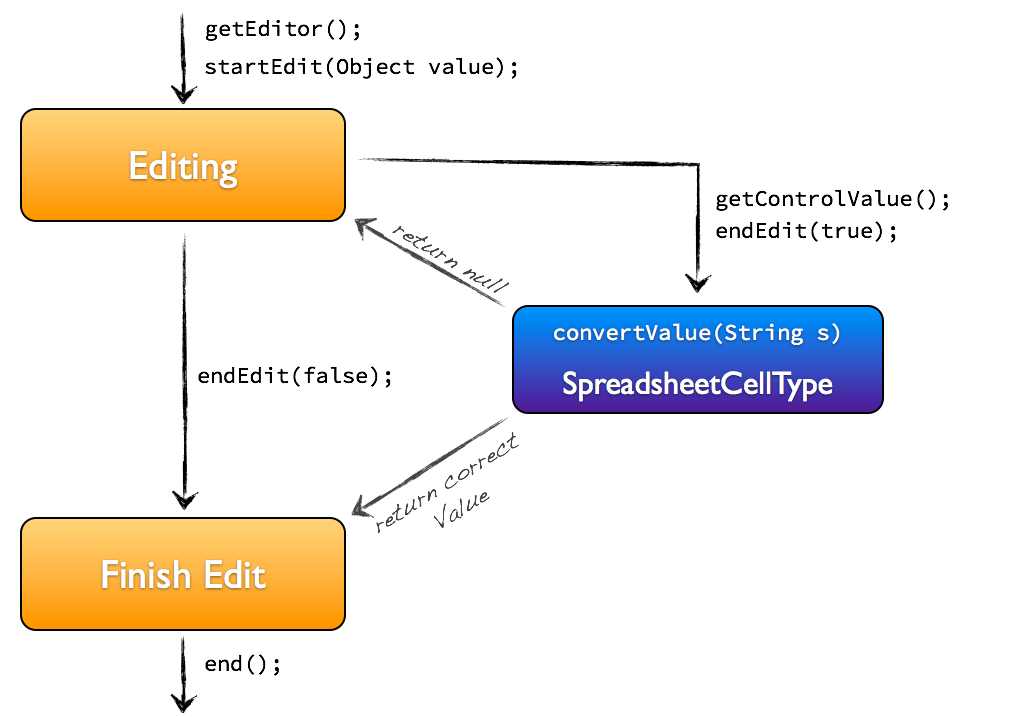
You just have to override the four abstract methods. Remember that you will never call those methods directly. They will be called by theSpreadsheetViewwhen needed.-
startEdit(Object): You will configure your control with the given value which isSpreadsheetCell.getItem()converted to an object. You do not instantiate your control here, you do it in the constructor. -
getEditor(): You will return which control you're using (for display). -
getControlValue(): You will return the value inside your editor in order to submit it for validation. -
end(): When editing is finished, you can properly close your own control.
Keep in mind that you will interact only withendEdit(boolean)where a true value means you want to commit, and a false means you want to cancel. TheSpreadsheetViewwill handle all the rest for you and call your methods at the right moment.
Use case :
Visual:
String 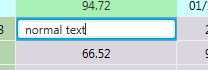
List 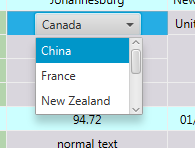
Double 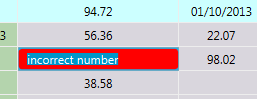
Date 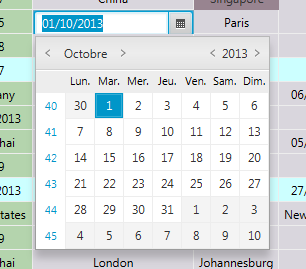
- See Also:
SpreadsheetView,SpreadsheetCell,SpreadsheetCellType
-
-
Nested Class Summary
Nested Classes Modifier and Type Class and Description static classSpreadsheetCellEditor.DateEditorASpreadsheetCellEditorforSpreadsheetCellType.DateTypetyped cells.static classSpreadsheetCellEditor.DoubleEditorASpreadsheetCellEditorforSpreadsheetCellType.DoubleTypetyped cells.static classSpreadsheetCellEditor.IntegerEditorASpreadsheetCellEditorforSpreadsheetCellType.DoubleTypetyped cells.static classSpreadsheetCellEditor.ListEditor<R>ASpreadsheetCellEditorforSpreadsheetCellType.ListTypetyped cells.static classSpreadsheetCellEditor.ObjectEditorASpreadsheetCellEditorforSpreadsheetCellType.ObjectTypetyped cells.static classSpreadsheetCellEditor.StringEditorASpreadsheetCellEditorforSpreadsheetCellType.StringTypetyped cells.static classSpreadsheetCellEditor.TextAreaEditorASpreadsheetCellEditorforSpreadsheetCellType.StringTypetyped cells.
-
Constructor Summary
Constructors Constructor and Description SpreadsheetCellEditor(SpreadsheetView view)Construct the SpreadsheetCellEditor.
-
Method Summary
All Methods Instance Methods Abstract Methods Concrete Methods Modifier and Type Method and Description abstract voidend()This method will be called at the end of edition.
You will be offered the possibility to do the configuration post editing.voidendEdit(boolean b)Whenever you want to stop the edition, you call that method.
True means you're trying to commit the value, thenSpreadsheetCellType.convertValue(Object)will be called in order to verify that the value is correct.
False means you're trying to cancel the value and it will be follow byend().
See SpreadsheetCellEditor descriptionabstract java.lang.StringgetControlValue()Return the value within your editor as a string.abstract javafx.scene.control.ControlgetEditor()Return the control used for controlling the input.doublegetMaxHeight()Return the maximum height of the editor.voidstartEdit(java.lang.Object item)This method will be called when edition start.
You will then do all the configuration of your editor.abstract voidstartEdit(java.lang.Object item, java.lang.String format, java.lang.Object... options)Does the same asstartEdit(java.lang.Object)but you have also theSpreadsheetCell.getFormat()sent.
-
-
-
Constructor Detail
-
SpreadsheetCellEditor
public SpreadsheetCellEditor(SpreadsheetView view)
Construct the SpreadsheetCellEditor.- Parameters:
view-
-
-
Method Detail
-
endEdit
public final void endEdit(boolean b)
Whenever you want to stop the edition, you call that method.
True means you're trying to commit the value, thenSpreadsheetCellType.convertValue(Object)will be called in order to verify that the value is correct.
False means you're trying to cancel the value and it will be follow byend().
See SpreadsheetCellEditor description- Parameters:
b- true means commit, false means cancel
-
startEdit
public void startEdit(java.lang.Object item)
This method will be called when edition start.
You will then do all the configuration of your editor.- Parameters:
item-
-
startEdit
public abstract void startEdit(java.lang.Object item,
                               java.lang.String format,
                               java.lang.Object... options)
Does the same asstartEdit(java.lang.Object)but you have also theSpreadsheetCell.getFormat()sent. This is useful when editing Date for example, when you want to display it with the cell format. Also options given by a Spreadsheetcell withSpreadsheetCell.getOptionsForEditor()are given.- Parameters:
item-format-options-
-
getEditor
public abstract javafx.scene.control.Control getEditor()
Return the control used for controlling the input. This is called at the beginning in order to display your control in the cell.- Returns:
- the control used.
-
getControlValue
public abstract java.lang.String getControlValue()
Return the value within your editor as a string. This will be used by theSpreadsheetCellType.convertValue(Object)in order to compute whether the value is valid regarding theSpreadsheetCellTypepolicy.- Returns:
- the value within your editor as a string.
-
end
public abstract void end()
This method will be called at the end of edition.
You will be offered the possibility to do the configuration post editing.
-
getMaxHeight
public double getMaxHeight()
Return the maximum height of the editor.- Returns:
- 50 by default.
-
-